🩺 Analysing and Removing Hangs in iOS Apps 🧞♂️

The #1 Padel Score Tracker Companion
With seamless point counting on your Apple Watch, Padel Time ensures precision and eliminates disputes, leaving you to focus on the game. You just need to raise your arm and click on the winning team on each point, nothing else.
This message is brought to you by a sponsor who helps keep this content free for everyone. If you have a moment, check them out. Your support means a lot!
Welcome to issue #63 of the iOS Coffee Break Newsletter 📬.
In last week's edition, I guided you through the process of analyzing app hangs using Instruments 😰.
This week, we will pick up where we left off with the same demo app. I have intentionally included code that blocks the main thread, and we will take a closer look at what is triggering the blockage.
We will also explore how to pinpoint the specific functions in our code that can be optimized to eliminate the hang!
This guide was created using Xcode 16.4, but all instructions should remain current for Xcode 26.
Determining whether the Main Thread is Busy or Blocked
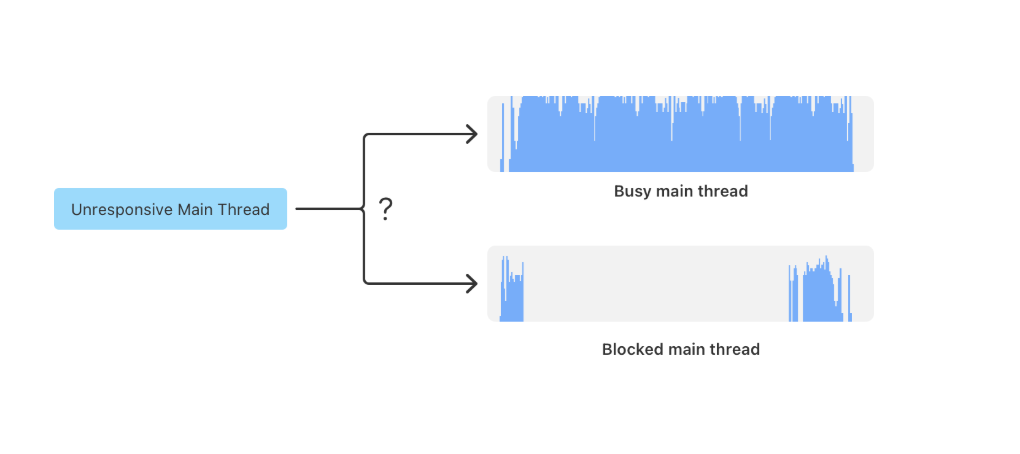
Once we have identified the hang, the next step is to check how much CPU the main thread is using:
- If the CPU usage is high, it suggests that the main thread is doing a lot of work.
- On the other hand, low CPU usage typically indicates that the main thread is probably blocked.
When you notice high CPU usage during the hang, we should investigate the tasks running on the main thread. But if the usage is low, it is more effective to focus on understanding what is preventing the thread from running, rather than what it is doing.
Explore Apple's Instruments tutorials to learn how to enhance app responsiveness, minimize memory consumption, and examine complex performance patterns over time.
To check this in Instruments, expand the HangApp track by clicking the small triangle to reveal its subtracks.
Then, right-click on the "Severe Hang" segment in any track and select "Set Inspection Range" from the menu.
After that, click on the Main Thread track to highlight it.
The main thread is the most important thread for analyzing hangs. Instruments displays it at the top.
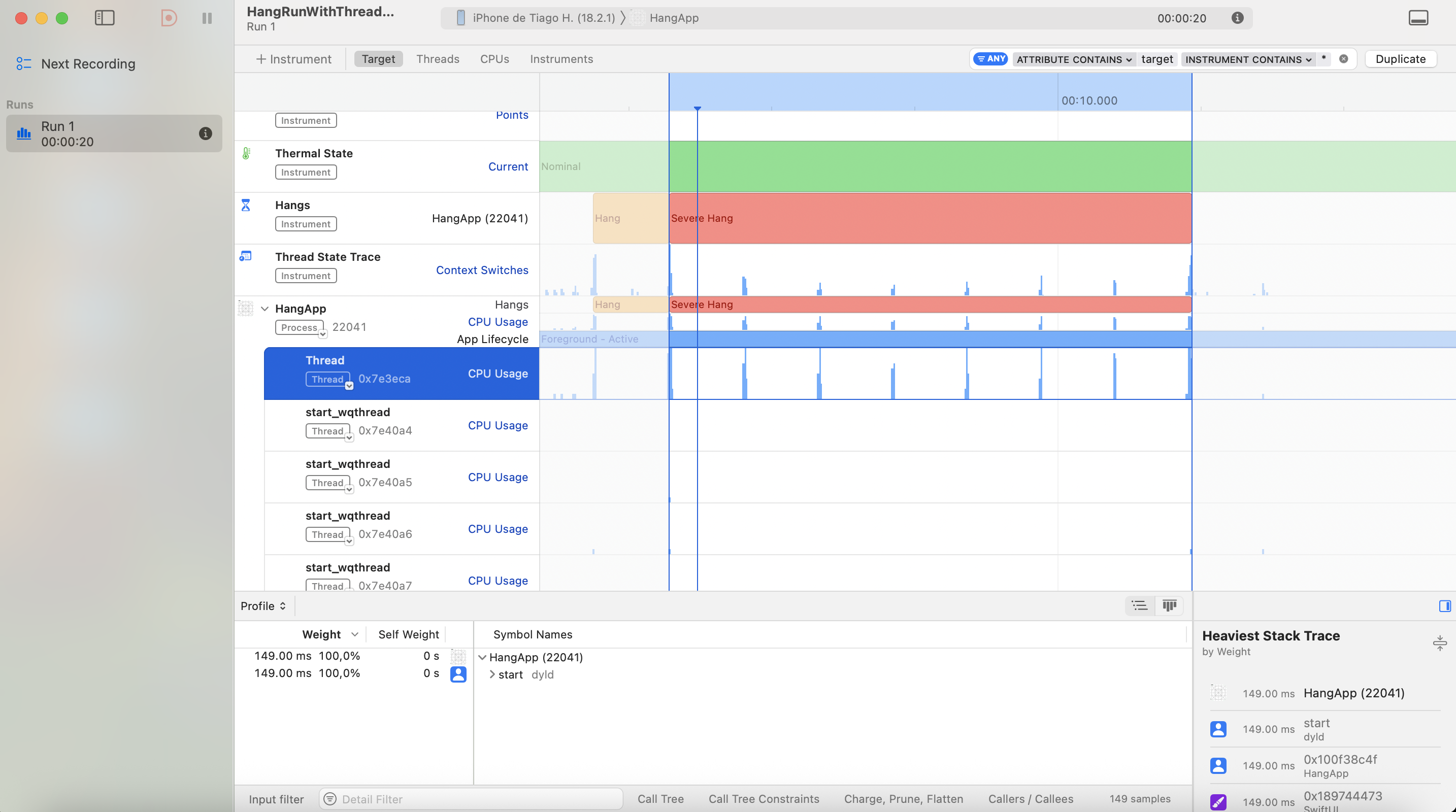
By examining the CPU Usage graph for the main thread during the hang, we can see that the CPU activity is minimal. This tells us that this is a blocked main thread hang.
The next step is to determine what is causing this blockage.
Enabling the Thread State Trace
To identify the root cause effectively, it is important to observe thread behavior in detail:
In Instruments, add the Thread State Trace tool by selecting it in the Instruments panel (+ Instrument > Type "Thread State Trace"). This visualization will help reveal which threads are blocked or excessively busy.
Since there isn't an existing Thread State Trace graph, we will need to run the Instruments again and reproduce the same scenario. After stopping the recording, Xcode will process the data and display the graph within Instruments, making it easier to analyze and resolve the issue.
Identifying Relevant Functions
The app hang is caused by intensive operations running on the main thread, which interferes with UI rendering and blocks user interaction. By leveraging Thread State Trace and carefully inspecting a specific portion of the timeline, we can trace the issue back to the function responsible for the hang, as illustrated in the image below:
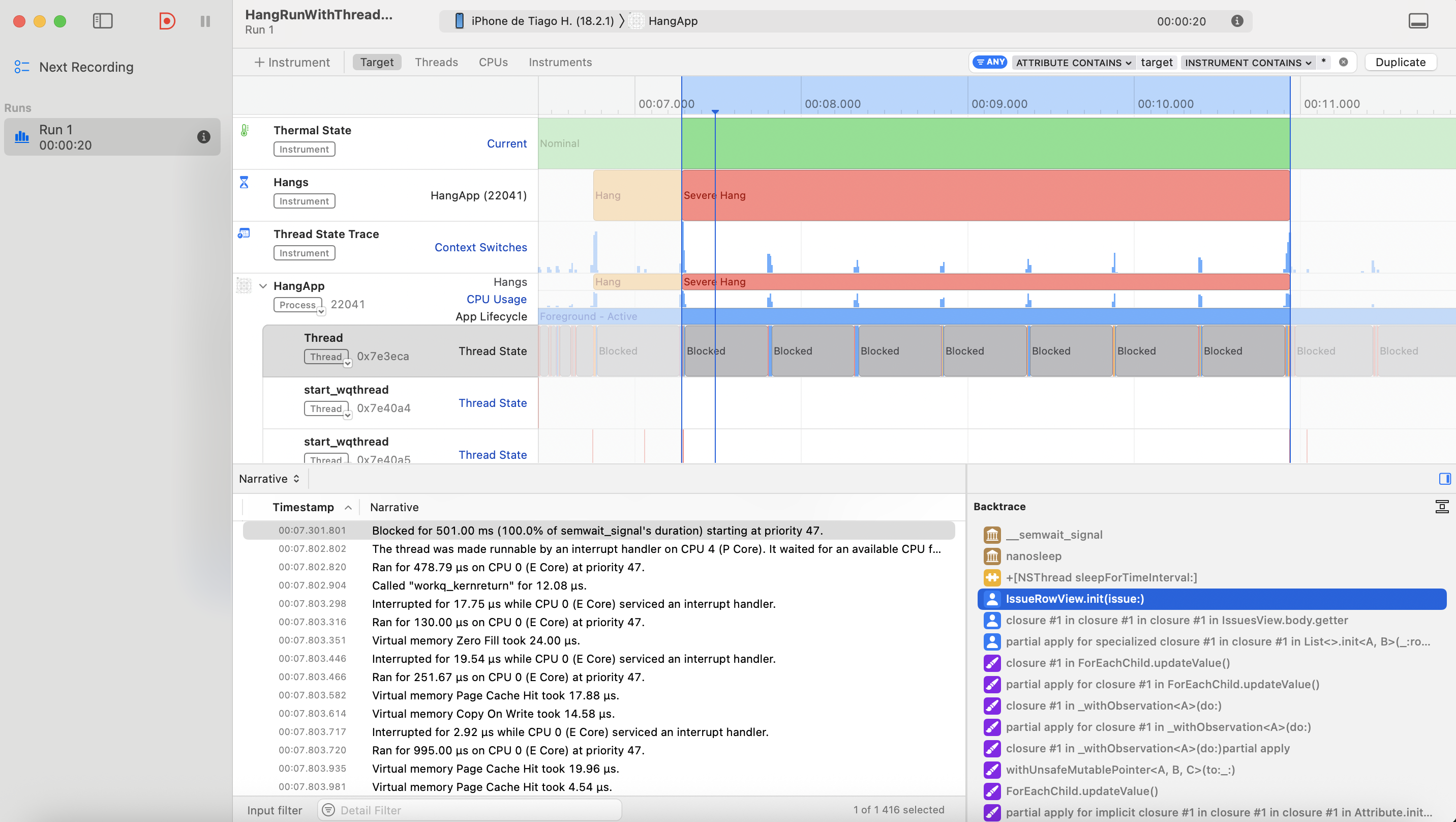
Upon reviewing the Thread State Trace graph and associated logs, here is what it is telling us:
- The Instruments timeline clearly highlights a significant hang in the "Hangs" section.
During this period, the main thread was unresponsive, unable to handle inputs or refresh the UI.
The call stack leads us to the
IssueRowView.init(issue:)method, where some resource-heavy task or delay occurred directly on the main thread, making the app stall. - A key observation is a recorded hang lasting 501 milliseconds, aligning with a simulated delay introduced using
Thread.sleep(forTimeInterval: 0.5)inside theIssueRowView.init(issue:)initializer. This confirms that this method is a primary contributor to the performance issue.
Below is the section of code that causes the thread blockage:
struct IssueRowView: View {
    let issue: Issue

    init(issue: Issue) {
        self.issue = issue
        // introduced an intentional delay that blocks the main thread
        Thread.sleep(forTimeInterval: 0.5)
    }

    var body: some View {
        [...]
    }
}
Fixing the Hang
As a straightforward demonstration, offloading the task to a background thread provides a quick and effective solution to eliminate the hang.
Below is the revised init method:
struct IssueRowView: View {
    let issue: Issue

    init(issue: Issue) {
        self.issue = issue

        DispatchQueue.global(qos: .background).async {
            // Perform heavy computation on a background thread
            Thread.sleep(forTimeInterval: 0.5)
        }
    }

    var body: some View {
        [...]
    }
}
With this change in place, running the app again will show no hangs detected in Instruments, confirming that the issue has been resolved! 💪
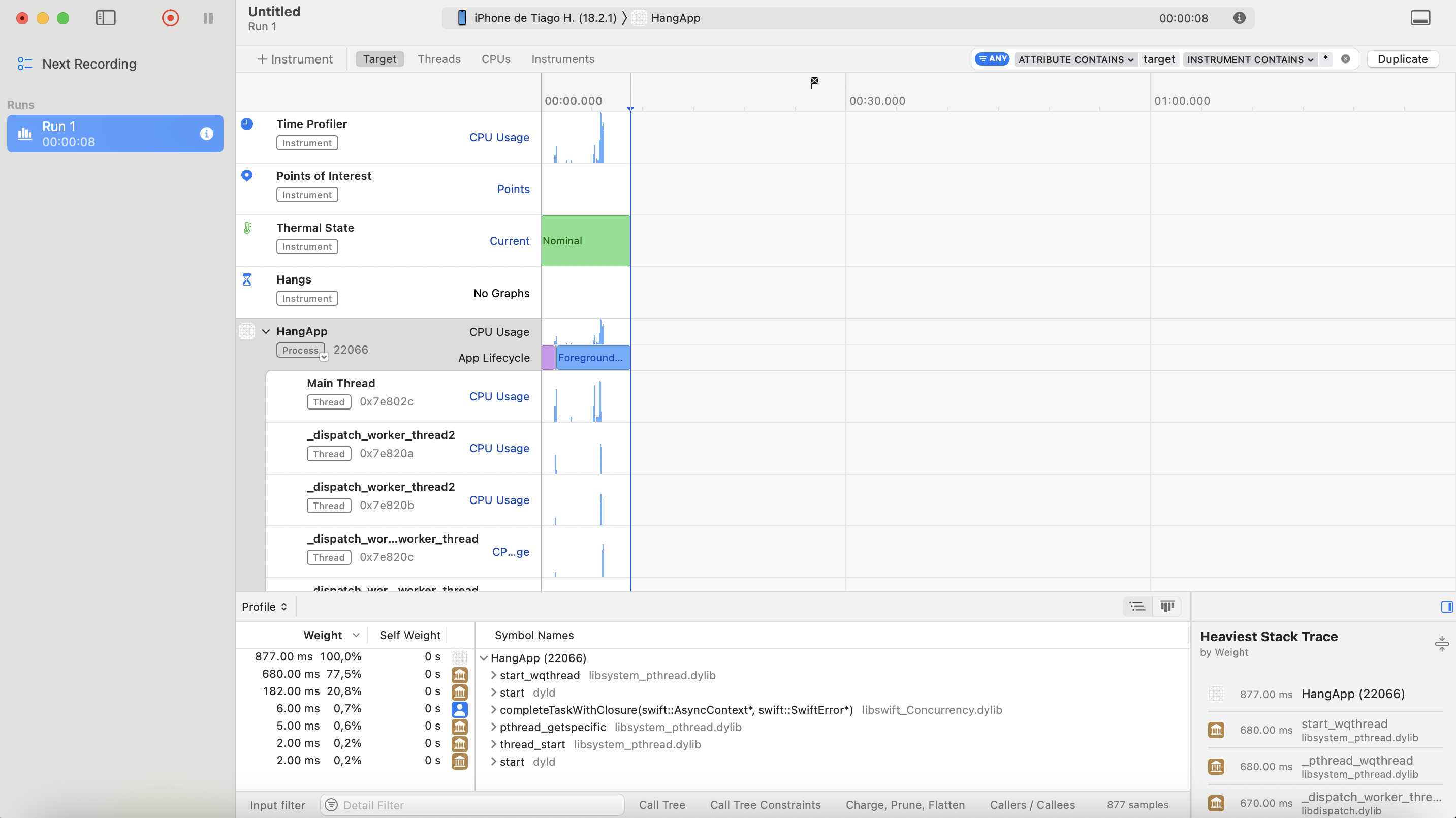
This example highlights how crucial it is to perform heavy computations on a background thread to maintain responsive UI updates and prevent major freezes!
To explore the full implementation of the sample hang application, visit the repository on GitHub.
🤝 Wrapping Up
Understanding the activity on the main thread is crucial to identify and address app hangs, which is vital for delivering a smooth user experience. For this, we can use tools such as Instruments to pinpoint performance issues. Make sure intensive tasks run on background threads, and reserve the main thread exclusively for UI updates.
Following these best practices will help you create fast, responsive, and well-performing iOS apps!
Have any feedback, suggestions, or ideas to share? Feel free to reach out to me on Twitter.
Have a great week ahead 🤎